Bonjour!
L29 React · lecture 4 · Le Bistro track 3 of 5
Le
marché
Effects and real data. Le Bistro's motto is "market first": the menu bends to what the morning market has. Today our menu comes from the real kitchen server.
- Theme
- useEffect, useRef, custom hooks
- Le Bistro today
- The real menu from the API
- Your project
- v0.3 · DummyJSON, saved cart
- Length
- 2 hours · one break
Le Bistro · L29 · 120 minutes
Today's menu
- AccueilHello where Le Bistro is today3′
- ApéritifQuestions and two homework demos8′
- EntréeProblem 1 the menu is a file5′
- PlatuseEffect and fetch loading, errors, CORS24′
- AtelierClasswork 1 products from DummyJSON15′
- Pause caféBreak music on, screens off10′
- Second platProblem 2 and custom hooks faster than the kitchen27′
- AtelierClasswork 2 with AI prompt it, then check it15′
- MasterclassOne prompt, the whole Le Bistro CRAFT, then the short version8′
- DessertWrap-up recap, homework, next time5′
Route Lecture 3 of 5
Le Bistro, lecture by lecture

L27 · done
Components
Home page and menu from components and a data file.
L28 · done
State
Add to cart works. Chips filter, search finds.
L29 · today
Effects
The real menu from the API. A cart that survives a refresh.
L30
Routing
Pages with their own address. Login and staff-only doors.
L31
Context
One cart and one session for the whole site.
Today's goal Press next to unveil it
From a file to the kitchen's server
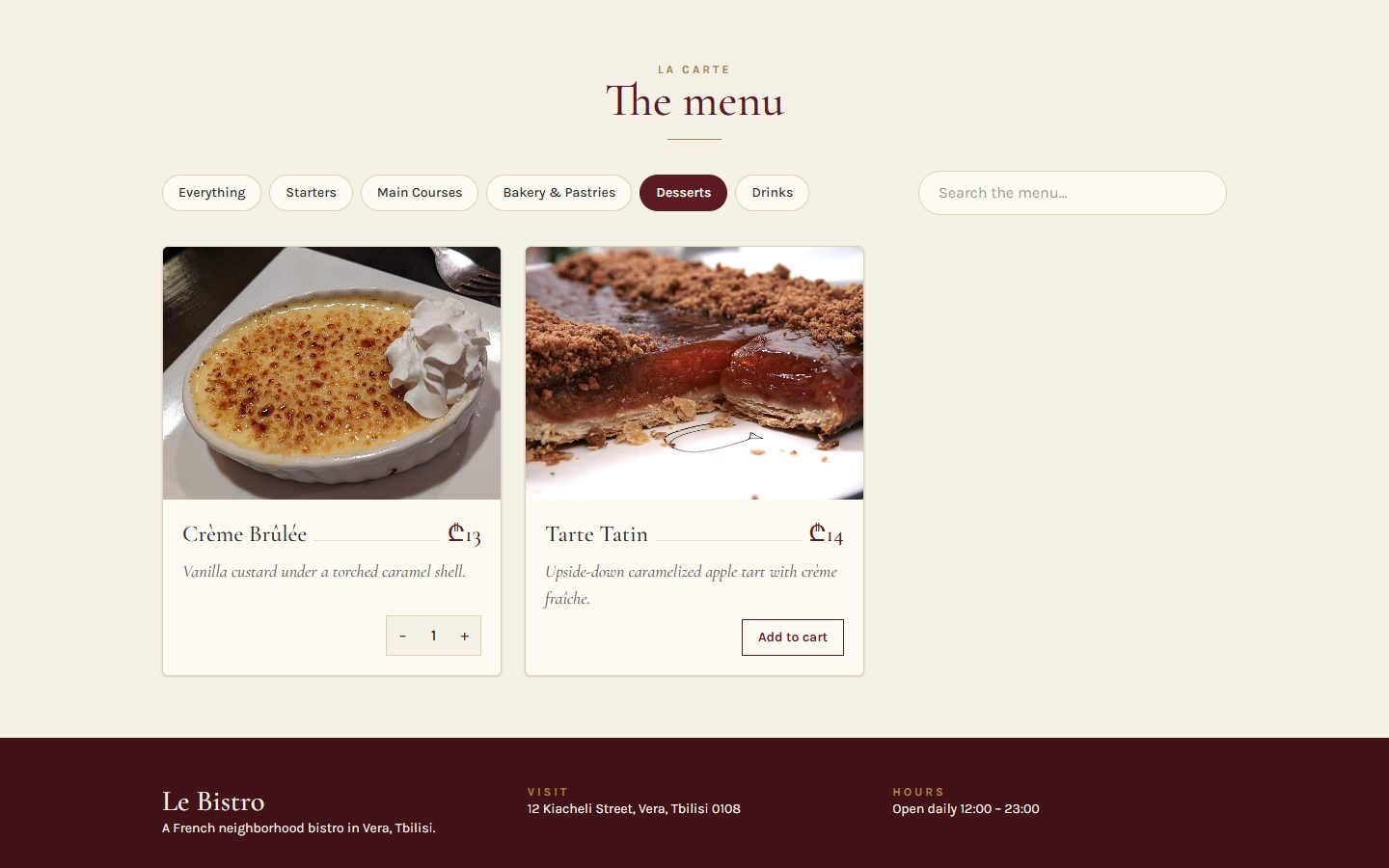
Left: 12 dishes we typed. Under the curtain: the real menu, a search that asks the server, and grey cards while the kitchen answers.
- 25 real dishes, live from the API
- Loading, error and empty states
- A search with a delay, and a cart that survives F5
 After L28
After today
After L28
After todayApéritif Before we start
Questions from last time?
useState, lifting state, new arrays, derived values.
Why [...cart, item] and not cart.push(item)?
React compares old and new state with ===. A pushed array is the same array, so React sees no change.
Where does state live when two components need it?
In their closest common parent. Data goes down as props, events come up as functions.
Should the cart total be state?
No. It is derived from the cart: calculate it during render.
Homework check Two volunteers, two minutes each
Show us your v0.2
Add two products, change a quantity in the cart panel, filter by a category. Then refresh the page.
Look for
- The cart lives in App
- New arrays: no
pushon state - Count and total are calculated
- The filtered list is calculated
- The same product shows the same quantity everywhere
Entrée · Problem 1 Before the new tool
The menu is a file.
The kitchen is a server.
The chef changes a price at 11:00. Our site still shows yesterday's, because we typed it.
Problem 1 What we have, what is real
Our file and the real menu
src/data/dishes.ts
- 12 dishes, typed by hand
- Prices from the day we copied them
- Bouillabaisse "off the menu" forever
- Changes need a new deploy
GET /api/v1/enterprise/dishes
- Every dish the kitchen serves today
- Today's prices, today's availability
- Filters on the server:
?category=drinks - A search:
/api/v1/enterprise/search?q=
Open it in the browser: srmsapi.stepacademy.ge/swagger
It's the same JSON shape as our Dish type. Only the source changes.
Problem 1 The first idea, and why it explodes
Fetch right inside the component?
render → fetch → setDishes → render → fetch …
Every render starts a request. Every answer triggers a render. It never stops.
Problem 1 Your turn
What would we need?
Plat · Solution 1 The tool
useEffect: code that runs after the render
Runs after React has put the render on the screen. Fetch, timers, listeners, localStorage live here.
Optional. Runs before the effect runs again, and when the component leaves the page.
When to run it again: after any render in which one of these values changed.
Solution 1 Press next, one moment at a time
The life of an effect
Cleanup always runs before the next effect, and once at the end.
Solution 1 When does the effect run again?
The dependency array decides
| You write | It runs | Use it for |
|---|---|---|
| useEffect(fn, []) | once, after the first render | a keyboard listener, a page view |
| useEffect(fn, [category]) | after the first render, and whenever category changes | fetching the dishes of a category |
| useEffect(fn) | after every render | almost never. With a setState inside: an endless loop |
The rule: list every value from the component that the effect uses.
The linter (eslint-plugin-react-hooks) checks it for you: "React Hook useEffect has a missing dependency".
Solution 1 The first real request fails
CORS: the server only talks to friends
Now fetch the relative path: fetch("/api/v1/enterprise/dishes"). Restart npm run dev after editing the config.
Solution 1 · Recipe Type it with me
The favourites come from the API
- State for the answer
nullmeans "no answer yet". A second state for failure.Favourites.tsx - The effect fetches onceEmpty dependency array: after the first render.
- Check
res.okfetch does not fail on 404 or 500. We throw ourselves. - Save the data or the failuresetState inside
thenandcatch: after the answer, never during render. - Three endings in the JSXError, loading (skeleton), data.
Solution 1 Design all of them, not only the happy one
Every request has four endings
dishes === nullGrey cards: the page keeps its shape while we wait.
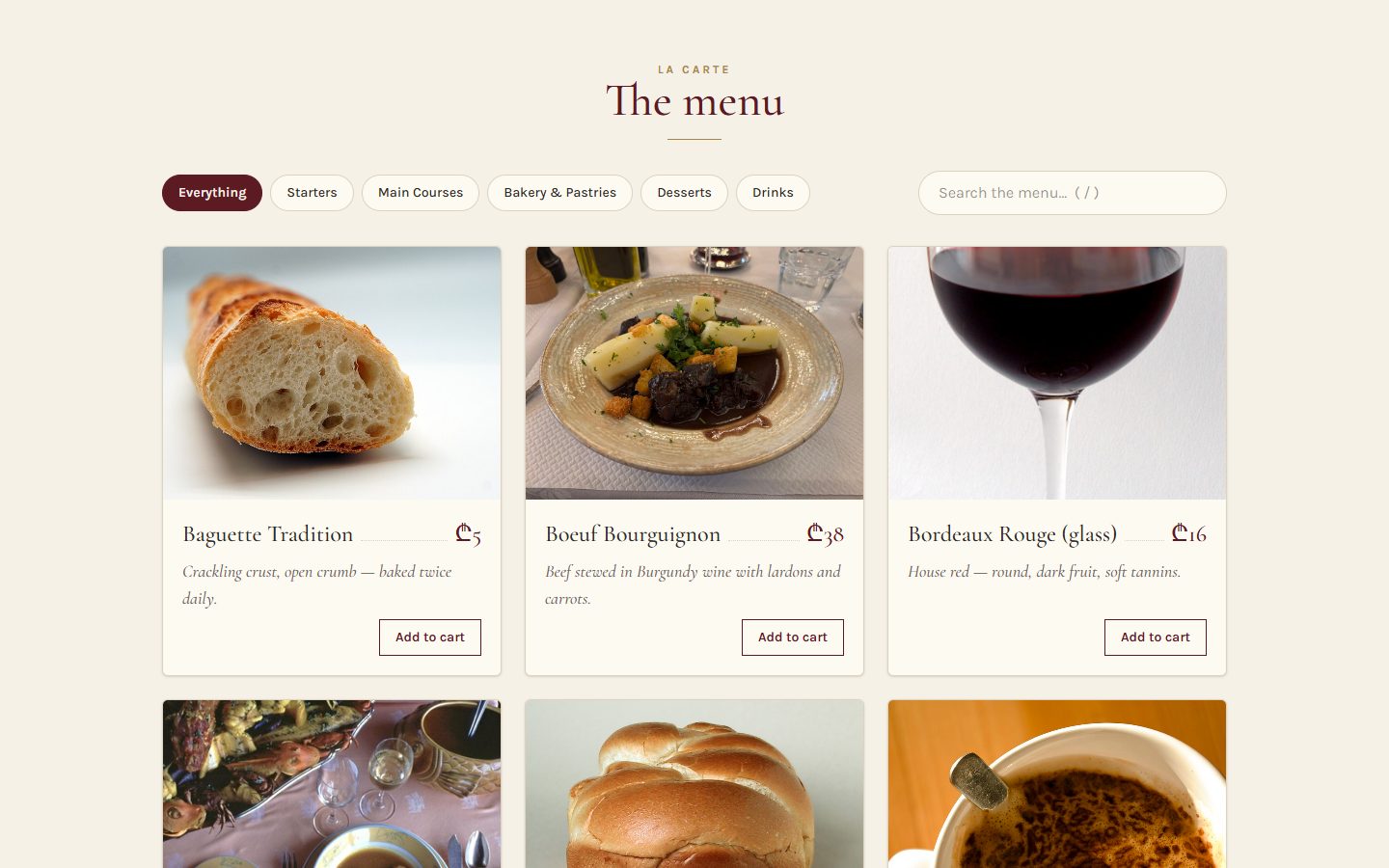
dishes.length > 0The real menu.
Nothing on the menu matches “pizza”.
dishes.length === 0Not an error: a valid answer with nothing in it.
We couldn't load the menu — please try again.
failed === trueNo internet, a 500, a typo in the URL.
Solution 1 Don't panic
"Why do I see two requests?"
In development, <StrictMode> runs every effect twice on purpose: effect, cleanup, effect.
It's a test, not a bug
If your effect has a correct cleanup, the user can't tell the difference. In production (npm run build) it runs once.
Solution 1 The errors you will see today
When effects go wrong
An async effect function
A missing dependency
An object created during render as a dependency
Trusting fetch with errors
Quick check The dependency array
This effect loads the dishes of the selected category. Which array?
The effect uses category, so it must run again when category changes. [] loads only the first category. [dishes] loops (the effect changes dishes). No array runs after every render: a loop too.
Atelier · Classwork 1 15 minutes, on your own project
Real products
Fetch your category
fetch("https://dummyjson.com/products/category/your-category")in auseEffectwith[].- The answer is
{ products: Product[] }: savedata.products. - A loading text while
products === null, an error message incatch.
A skeleton
- Grey placeholder cards instead of the loading text (
animate-pulse).
Categories from the API
- Your chips come from
https://dummyjson.com/products/categories, filtered to your theme.
Done when
- Your data file is no longer imported
- DevTools → Network shows the request
- Offline mode shows your error message
- No endless requests
Stuck?
useEffect(() => {
  fetch(URL)
    .then((res) => res.json())
    .then((data) => setProducts(data.products))
    .catch(() => setFailed(true));
}, []);Pause café 10 minutes
Pause café
After the break: we click faster than the kitchen cooks.
Second plat · Problem 2 The real world is slow and busy
Faster than
the kitchen.
Main courses take the API 3 seconds, drinks 0.2 seconds. Guests click faster than that.
Problem 2 Try it: click "Main Courses", then quickly "Drinks"
The slow answer wins
Delays are the real API's: main courses 3 s, drinks 0.2 s, others 0.5 s.
Problem 2 Two more pains
Ten letters, ten requests. Then 429.
And refresh the page…
…the cart is empty. State lives in memory. F5 wipes the memory.
Problem 2 Your turn
What would we need now?
Solution 2 · Recipe The cleanup cancels, the tag protects
Cancel the old request
- One AbortController per runA remote control for one fetch.
- Give fetch its signalSo the controller can stop it.
- The cleanup abortsRuns before the next effect: the old request dies.
- Ignore our own cancelAn aborted fetch rejects. That's not an error to show.
- Tag the answer with its requestShow data only if it belongs to the current path.
loadingis derived.
useEffect(fetch, abort)
loading / error / data
Solution 2 Custom hooks
Move the logic into a hook
1 · Move
The state, the effect and the derived values move out of the component.
2 · Call it
A custom hook is a function whose name starts with use and that calls other hooks.
3 · Reuse it
Each component that calls it gets its own state. Hooks share logic, not data.
Solution 2 · Recipe Copy or type: this file is the heart of today
The useApi hook
- A function named use…
- One state: the last answer
- The effect from the last slide
- Return derived values
- Use it
Solution 2 · Recipe One line per request
MenuSection asks the API
- The path depends on the chip"all" → every dish, otherwise
?category=.MenuSection.tsx - Two requests, two linesCategories for the chips, dishes for the grid.
- The four endingsSkeleton, error, empty, grid.
- Delete the data filesNo more
data/dishes.ts,data/categories.ts.
Try the race again: Main Courses, then Drinks.
The grid stays on drinks. The cancelled request shows as "(canceled)" in DevTools.
Solution 2 · Recipe A second custom hook
A cart that survives F5: useLocalStorage
useState
useLocalStorage
Solution 2 One request instead of ten
Debounce: wait until typing stops
Same idea as the race: a cleanup cancels the old timer.
Solution 2 · Recipe A third, tiny hook
useDebounce and the search
- The hookA timer in an effect. The cleanup clears it.src/hooks/useDebounce.ts
- Debounce the queryThe input stays instant. The request waits.MenuSection.tsx
- Search or menu, never bothPass
nullto the request we don't need. - The 429 messageThe API says when to try again:
retryAfter.
Solution 2 The last hook of the day
useRef: press "/" to search
- A ref is a box React doesn't watchChange
ref.currentand nothing re-renders. Here it holds the real<input>.SearchBox.tsx - Attach it
ref={inputRef}: React puts the DOM element in the box. - Listen to the keyboardA listener on
windowis the outside world: an effect. - Remove it in the cleanupOr every StrictMode remount adds a second listener.
Solution 2 The most important warning of today
You might not need an effect
An effect to calculate
Two renders instead of one, a second copy of the data, and a lint error: "set-state-in-effect".
Just calculate it
Derived value, from L28. One render, one truth.
Effects are for the outside world: the network, timers, the browser, the keyboard.
If you only transform props or state, you don't need one.
Solution 2 Le Bistro, version 0.3
The page at the end of today
- The menu and the chips come from the API
- Skeleton, error, empty and data states
- Old requests are cancelled
- The search waits 400 ms
- The cart survives F5
Full code: bistro-track/code/after-L29.
Solution 2 The bugs of the second half
When hooks go wrong
A listener without cleanup
A hook inside an if or a loop
A timer that is never cleared
Reading a ref while rendering
Quick check Effect or not?
Which one needs useEffect?
A, B and D are calculations: derive them during render. localStorage is outside React: writing to it is a side effect.
Atelier · Classwork 2 · with AI 15 minutes, on your own project
Prompt it: search and a saved cart
- BaseThe cart survives F5 with a
useLocalStorage(key, initial)hook. - PlusA debounced search with
dummyjson.com/products/search?q=and anAbortControllercleanup. - ProYour own
useApi(url)hook for the products and the categories.
Your prompt, in five parts (CRAFT)
ContextYour shop and stack. DummyJSON allows any origin: no proxy. Paste App.tsx and your search box.
Role"A React teacher who explains every effect."
ActionThe Base task, then Plus in a follow-up prompt.
Format"Only the files that change, complete, with their paths. Hooks in src/hooks/."
Target"Point out every cleanup and the reason it's there."
Done when
- F5 keeps the cart
- Typing six letters sends one request
- Every effect that starts something cleans it up
- AI.md: your prompt and one thing you changed
A sample prompt · Tech store
CONTEXT
My shop "Circuit" sells smartphones, laptops and
tablets. Vite + React 19 + TypeScript + Tailwind 4.
DummyJSON allows any origin. App.tsx: (pasted)
ROLE
A React teacher who explains every effect.
ACTION
Keep the cart after F5 with a useLocalStorage(key,
initial) hook in src/hooks/useLocalStorage.ts, and use
it in App for the cart.
FORMAT
Only the files that change, complete, with their paths.
TARGET
I'm learning effects: point out every cleanup and why
it's there.
Masterclass · LAB-29 Press next: the prompt opens part by part
Le Bistro so far, in one prompt
Contextwhat exists and what we use
Le Bistro, a French restaurant site. Vite + React 19 + TypeScript + Tailwind CSS 4.
API: https://srmsapi.stepacademy.ge. It only accepts its own site, so call
/api/... through a Vite proxy. GET /api/v1/enterprise/dishes, /categories,
/search?q= (10 requests a minute, then 429 with Retry-After).
Rolewho answers
You are a senior React developer who writes code for beginners to read.
Actionwhat to build, step by step
Build the home page and the menu with a working cart, now on real data:
- A useApi(path) hook: loading, error and empty states, an AbortController in
  the cleanup, every answer tagged with its path.
- Grey skeleton cards while loading. Categories and dishes from the API.
- A search debounced by 400 ms (useDebounce), with a friendly 429 message.
- The cart survives F5: useLocalStorage("bistro.cart"). "/" focuses the search.Formatwhat the answer looks like
The file tree first, then every file in full with its path, vite.config.ts too.
Targetwho reads it, when it's done
Students learning effects: no setState during render, complete dependency
arrays, one comment per cleanup. It must pass npm run build.
Masterclass · LAB-29 The AI writes fast. You decide if it's right.
Run it, then check it
- Copy the prompt into an AI toolClaude, ChatGPT, Copilot Chat: any of them; nothing to attach: the data comes from the API
- Build what it gives backa new Vite project, every file pasted at its path
- Run
npm run devandnpm run buildan error message goes straight back into the chat - Compare with
code/after-L29the version we built by hand
Check it with what you learned today
- Every fetch is in an effect, with a cleanup that aborts it
- The dependency arrays list everything the effect uses
- No
useEffect(async () => …) - Relative
/api/...paths and the proxy, no absolute API address - The search waits 400 ms and handles 429
AIs often forget the cleanup, so a slow answer overwrites a newer one. You saw that race today.
Masterclass · LAB-29 The same five parts, without the labels
The short version
You're a senior React developer writing for beginners who are learning effects. Build Le Bistro as a Vite + React 19 + TypeScript + Tailwind 4 app on the real API at https://srmsapi.stepacademy.ge, called as /api/... through a Vite proxy (dishes, categories, and a search limited to 10 requests a minute). Make the menu, the cart and the search work with a useApi(path) hook (loading, error, empty, AbortController cleanup, answers tagged by path), skeleton cards, a 400 ms debounced search with a kind 429 message, a cart saved with useLocalStorage("bistro.cart"), and "/" to focus the search. Show the file tree, then every file in full with its path, vite.config.ts included. Keep the dependency arrays complete, never set state during render, comment each cleanup, and make sure npm run build passes.
How CRAFT works
The five parts are a checklist for your thinking, not a form to fill in. Once all five are there, the labels can go: the prompt reads like a message to a colleague.
Dessert What we solved today
Two problems, two tools
Problem 1
Our menu was a file. Fetching during render looped forever.
useEffect
Talk to the outside world after the render. Dependencies say when to run again. Design loading, error and empty.
Problem 2
Slow answers won the race, every keystroke was a request, F5 emptied the cart.
Cleanup and custom hooks
Cleanups cancel old work. useApi, useDebounce, useLocalStorage package it for reuse. useRef holds what React doesn't watch.
Dessert Click a card to check yourself
What does this do?
Runs fn once, after the first render.
A cleanup: cancels the old request before the next effect.
Turns a 404 or 500 into an error we can show.
The query, but only after 400 ms without typing.
A box that survives renders and doesn't cause them. Often holds a DOM element.
A custom hook: reusable logic. Each caller gets its own state.
Homework Before L30
Your shop, version 0.3
Real data
- Products come from DummyJSON. The data file is gone.
- Loading (skeleton), error and empty states.
- The cart is saved with
useLocalStorage. - Category chips load products with
?categoryor the category endpoint, with a cleanup.
Search
- A debounced search with
/products/search?q=. - "/" focuses the search box (
useRef).
Before you submit
- No missing-dependency warnings
- Every listener and timer has a cleanup
- One request per search, not per letter
- Live on Vercel
Full brief and grading: homework.md.
L29 Le marché
Merci!
Questions now, or in the class chat. See you at L30.